Daymark and the value of a quieter starting point
Daymark makes room for a choice between picking up your iPhone and opening the next thing.
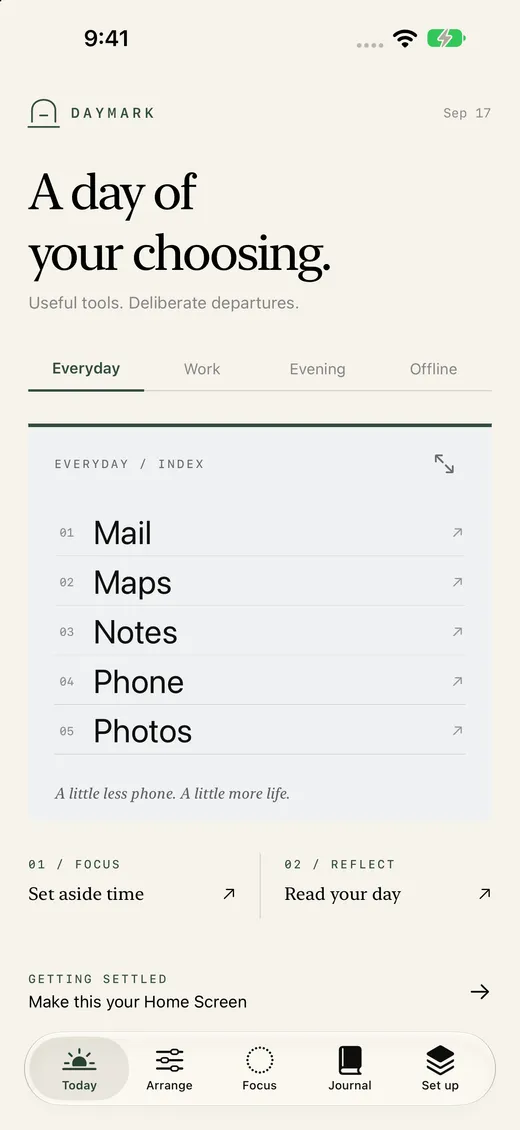
Many phone interactions begin before we have quite decided what we want to do. We pick up the device, see a familiar grid, and open something almost automatically. Daymark began with a small design question: what would a more deliberate starting point feel like?
The answer we are building is not a system-level replacement for the iPhone Home Screen. Daymark: Intentional Home is an app with a configurable launcher and Home Screen widgets. iOS still controls the Home Screen, dock, widget placement, notifications, and the rest of the system interface. That boundary matters because it shapes what Daymark can honestly promise.
Let people choose what is visible
Daymark lets someone arrange launcher lists for apps, websites, and Apple Shortcuts. The goal is a starting surface shaped around the things they mean to use, instead of another busy catalogue to scroll through.
There are four independent routines: Everyday, Work, Evening, and Offline. Each can have its own list and appearance. “Offline” is a name for a routine; it does not disconnect the phone. The routines are simply a way to make different moments feel distinct without pretending that every day follows one pattern.
Typography, colour schemes, Home Screen widgets, and a matching wallpaper help the interface feel cohesive. They are useful details when someone will see the same surface many times a day.
Make the pause optional
For selected launches through Daymark, a pause can appear before the handoff. It offers a moment to continue or step away. It does not block access to another app, and it does not silence notifications.
That is a deliberate limit. A prompt that respects a person’s choice fits the product better than a claim to control their phone. Daymark also includes a timer, but its minutes represent elapsed time. They are not proof that every minute was focused.
Keep the record honest and private
Daymark’s daily Journal records activity through Daymark: launch handoffs, decisions to step away, and elapsed timer sessions. It does not measure total device screen time. The distinction is important. A smaller, accurate record is more useful than a broad metric the app cannot verify.
Layouts, preferences, and Daymark activity are stored on the device and shared locally with its widget. The current product has no developer-operated cloud account, ads, analytics, or tracking. The privacy policy explains the details, including backup considerations.
What this says about the product
Daymark is one example of a principle we bring to our work at Red Comet: make the useful action clear, and state the limits with the same care as the features. A quiet interface cannot make choices for someone. It can offer a more considered place to make them.
Daymark is preparing for App Store submission and is not yet available there. You can explore the product and its setup guide on this site while we finish that work.